When you press a keypad digit during a call, for example to choose an option on an automated menu, switchboard or IVR, the tone (known as DTMF) needs to travel from your keypad, through Natterbox, to the number you are connected to. This guide helps agents and administrators work out why those key presses sometimes are not registered, and how to resolve it. In most cases the cause is the state of the Webphone or the browser rather than the number being dialled.
Symptoms
You press a digit to select a menu option and nothing happens, or the menu says the option was not recognised.
The problem is intermittent - key presses worked earlier in the day and then stopped, or they work on one call and not the next.
It can appear to be linked to "certain numbers", but the same menu often works when you call back a short time later.
Everything else on the call sounds normal - you can hear the other party and they can hear you.
ℹ️
Note: The most common cause is that the webphone briefly lost and regained its connection (for example after your computer slept, locked, or changed network). After a reconnection, the part of the webphone that passes key presses into the call can stop working until the webphone is rebuilt, which is why the problem often looks random rather than tied to a specific number.
Quick Fixes To Try First
Work through these in order. The earlier steps are the fastest and resolve most cases.
Reload the CTI: in the dialpad, type ##0 and press the call button. This refreshes the CTI without a full logout.
If you use the Natterbox webphone pop-up window, try pressing the keys there rather than in the Salesforce CTI. If it still fails, close the pop-up, wait a few seconds for it to reopen, and try the key press again.
If the problem continues, log out of Salesforce, close all browser tabs, and log back in. This rebuilds the webphone from scratch and clears the most common cause.
Reset your browser site settings and permissions, then relaunch the CTI and webphone. See How to Reset Site Settings.
If it only happens after the browser tab has been idle or in the background, close all Salesforce tabs and the webphone window and reopen them. In Google Chrome, also make sure the Third Party Storage Partitioning flag is disabled.
If your webphone disconnects regularly, test your connection using the Network Stability Tests, as an unstable network is a frequent cause of the disconnections behind this issue.
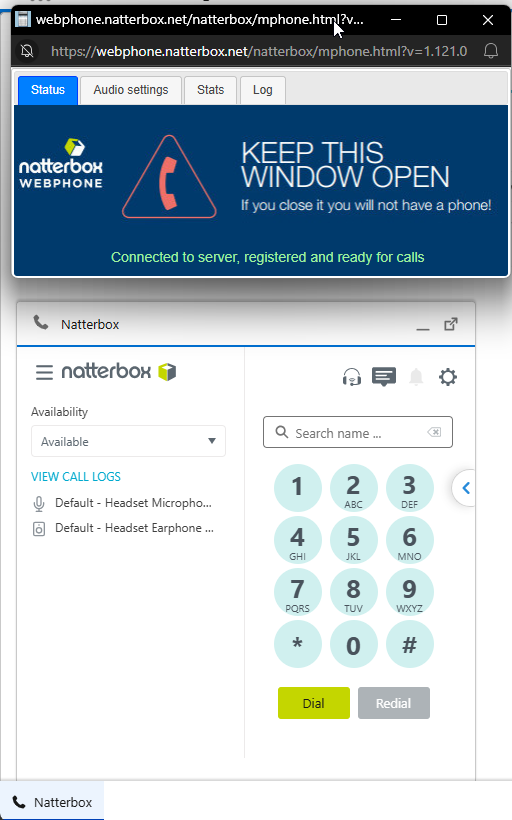
Common Causes
Use the table below to match what you are seeing to the most likely cause and the action to take.
Likely cause | What you notice | What to do |
|---|---|---|
Webphone connection dropped and reconnected | Intermittent; often starts after your computer slept, locked, reconnected to Wi-Fi or VPN, or changed network. Seems random rather than tied to one number. | Reload the CTI with ##0, use or reopen the webphone pop-up keypad, and if it persists log out and back in to rebuild the webphone. |
Browser site settings or permissions | Key-press problems alongside microphone, pop-up or audio issues. | Reset your browser site settings and permissions. |
Browser inactivity or background tab | Fails after the Salesforce tab has been idle or in the background for a while. | Close all Salesforce tabs and the webphone window, reopen them, and in Chrome confirm Third Party Storage Partitioning is disabled. |
Unstable network | The webphone disconnects or reconnects, or call quality dips, around the same time. | Run the network stability tests and address any packet loss or jitter. |
Destination phone system or carrier | Only one or a few external numbers are affected, and the same menu also fails when you call from a mobile. | Raise it with the organisation you are calling or your telephony carrier. As a workaround, try a different outbound caller ID. |
When Only Certain External Numbers Are Affected
If key presses fail only when calling one or two specific external numbers, and the same menu also fails when you dial that number from a mobile, the issue is usually with how the destination's phone system or carrier handles keypad tones, not with Natterbox. In this situation, raise it with the organisation you are calling or with your telephony carrier. As a temporary workaround, try placing the call using a different outbound caller ID.
Before You Contact Support
If the quick fixes do not resolve it, raising a case with a few details helps us pinpoint the cause quickly. Where possible, capture:
The number you called and the exact date and time of a failed attempt.
Which keypad you used, the Salesforce CTI or the Natterbox Webphone pop-up window.
What happened just before it started, such as your computer sleeping or locking, or a Wi-Fi or VPN change.
Which browser you use, and whether anyone else is affected.
💡
Tip: If you can, save your webphone logs before you log out of Salesforce, as logging out resets them and clears the evidence of what happened.
FAQs
Why do my key presses work on some calls but not others?
Because the cause is usually the state of the webphone after a brief disconnection, not the number you are calling. Once the webphone has reconnected without fully recovering, key presses can fail on any call until it is rebuilt, which is why it can look random and why reloading or logging back in fixes it.
Why does logging out of Salesforce and back in fix it?
Logging out and back in rebuilds the webphone from scratch, which restores the component that passes your key presses into the call. Reloading the CTI with ##0 or closing and reopening the webphone pop-up often achieves the same thing more quickly.
It only happens on one external number, is this a Natterbox problem?
Probably not. If the same menu also fails when you call that number from a mobile, the issue is most likely with the destination's phone system or carrier. Raise it with the organisation you are calling, and as a workaround try a different outbound caller ID.
What is the quickest thing to try in the middle of taking calls?
Press the keys in the Natterbox webphone pop-up window rather than the Salesforce CTI, or close and reopen the pop-up and try again. Reloading the CTI with ##0 is also quick. These are all faster than a full Salesforce logout but these are all things that can’t be done during a call.
Could my network be causing this?
Yes. An unstable network can cause the webphone to disconnect and reconnect, which is the most common trigger for key presses failing. Run the network stability tests, and if you see packet loss or high jitter, address the network connection before raising a case.